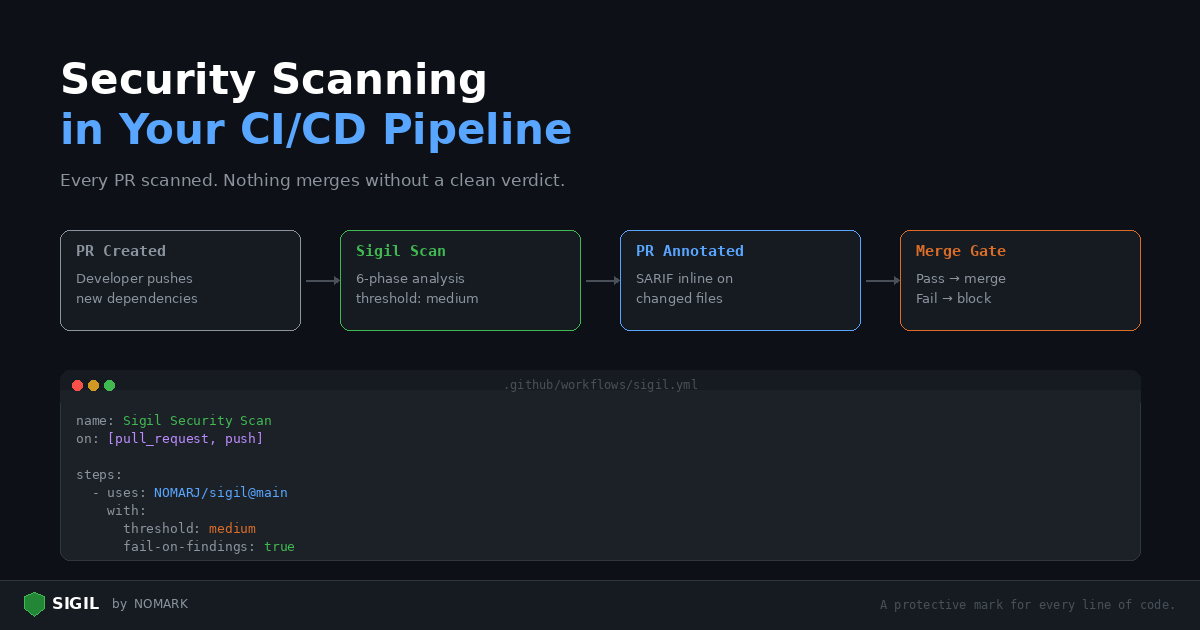
Running Sigil locally is a good start. Running it in CI means every pull request is scanned automatically, and nothing merges without a clean verdict.
This post walks through setting up Sigil in GitHub Actions, handling findings in pull requests, and configuring thresholds for your team.
GitHub Actions: basic setup
Create .github/workflows/sigil.yml:
```yaml name: Sigil Security Scan on: pull_request: push: branches: [main]
jobs: scan: runs-on: ubuntu-latest steps:
-
uses: actions/checkout@v4
-
name: Run Sigil scan
uses: NOMARJ/sigil@main with: path: . threshold: medium fail-on-findings: true ```
This scans your entire repository on every PR and push to main. If findings meet the medium threshold or higher, the workflow fails.
Understanding the threshold
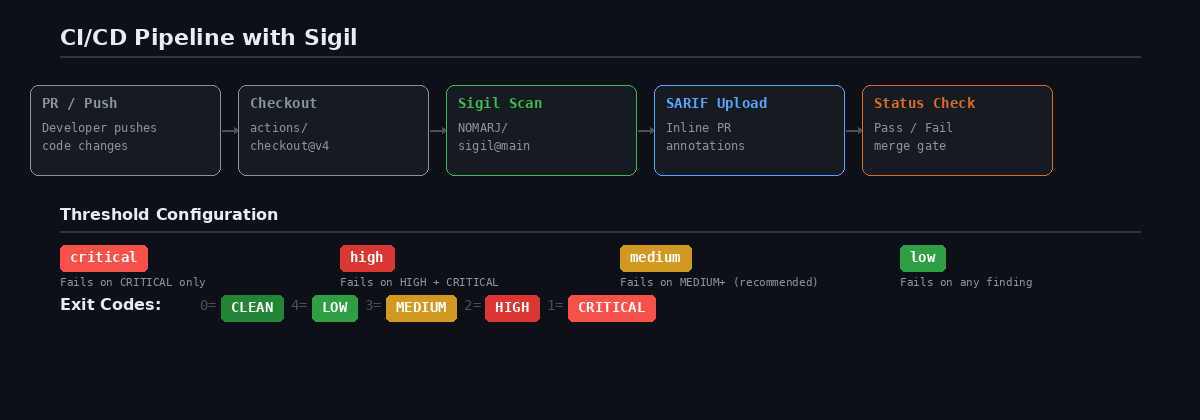
The threshold input controls which findings fail the build:
| Threshold | Fails on |
|---|---|
low |
Any finding (LOW, MEDIUM, HIGH, CRITICAL) |
medium |
MEDIUM, HIGH, or CRITICAL findings |
high |
HIGH or CRITICAL findings only |
critical |
CRITICAL findings only |
Recommended: Start with medium. This catches real threats without failing on every os.environ access in your codebase. Tighten to low once you've addressed existing findings.
Adding SARIF for inline annotations
SARIF (Static Analysis Results Interchange Format) gives you inline annotations directly on the PR diff:
```yaml
- name: Run Sigil scan
uses: NOMARJ/sigil@main with: path: . format: sarif upload-sarif: true ```
After the scan, findings appear as annotations on the changed files in your PR. Reviewers see exactly which lines triggered and why.
Scanning only changed files
For large repositories, scanning everything on every PR is slow. Scan only the changed files:
```yaml jobs: scan: runs-on: ubuntu-latest steps:
- uses: actions/checkout@v4
with: fetch-depth: 0
- name: Get changed files
id: changed run: | FILES=$(git diff --name-only origin/main...HEAD | tr '\n' ' ') echo "files=$FILES" >> $GITHUB_OUTPUT
- name: Run Sigil scan
uses: NOMARJ/sigil@main with: path: ${{ steps.changed.outputs.files }} threshold: low ```
This is fast and catches anything new without re-scanning the entire codebase.
Requiring Sigil to pass before merge
-
Add the workflow above
-
Go to Settings > Branches > Branch protection rules
-
Select your main branch
-
Enable Require status checks to pass before merging
-
Search for and select the Sigil scan job
Now, no PR can merge until the Sigil scan passes.
Adding threat intelligence in CI
For authenticated scans with community threat intelligence, add your Sigil API token as a repository secret:
-
Generate a token:
sigil login(then check~/.sigil/token) -
Add it as a repository secret: Settings > Secrets > New repository secret →
SIGIL_TOKEN -
Reference it in the workflow:
```yaml
- name: Run Sigil scan
uses: NOMARJ/sigil@main with: path: . sigil-token: ${{ secrets.SIGIL_TOKEN }} ```
Authenticated scans check packages against the community threat database. If a dependency has been reported as malicious, you will know before it reaches production.
Handling false positives
Your codebase probably has legitimate uses of eval(), subprocess, or os.environ. These will trigger findings.
Option 1: Raise the threshold
Set threshold: high to only fail on serious findings.
Option 2: Add a .sigilignore
Exclude files that intentionally use flagged patterns:
```bash
.sigilignore
tests/ scripts/build.py tools/codegen.js ```
Option 3: Separate scan jobs
Run a strict scan on source code and a lenient scan on everything else:
```yaml jobs: scan-source: runs-on: ubuntu-latest steps:
-
uses: actions/checkout@v4
-
uses: NOMARJ/sigil@main
with: path: src/ threshold: low fail-on-findings: true
scan-other: runs-on: ubuntu-latest steps:
-
uses: actions/checkout@v4
-
uses: NOMARJ/sigil@main
with: path: . threshold: high fail-on-findings: false # Report but don't block ```
GitLab CI
Include the Sigil template in your .gitlab-ci.yml:
```yaml include:
- remote: 'https://raw.githubusercontent.com/NOMARJ/sigil/main/.gitlab-ci-template.yml'
sigil-scan: stage: test extends: .sigil-scan variables: SIGILSCANPATH: "." SIGILTHRESHOLD: "medium" SIGILFAILONFINDINGS: "true" ```
Generic CI
For Jenkins, CircleCI, Bitbucket, or any other CI system:
```bash
Install
curl -sSL https://sigilsec.ai/install.sh | sh
Scan
sigil scan . --format json > sigil-report.json
Check exit code
if [ $? -ge 2 ]; then echo "HIGH or CRITICAL findings — failing pipeline" exit 1 fi ```
Exit codes: 0 = CLEAN, 4 = LOW, 3 = MEDIUM, 2 = HIGH, 1 = CRITICAL.
Alerts
Get notified when CI scans find issues. Configure via the dashboard (Settings > Alerts) or the API:
-
Slack: POST scan summaries to a channel
-
Email: Send findings to your security team
-
Webhook: Send JSON payloads to any endpoint
Full CI/CD documentation: CI/CD Integration Guide | Install: curl -sSL https://sigilsec.ai/install.sh | sh