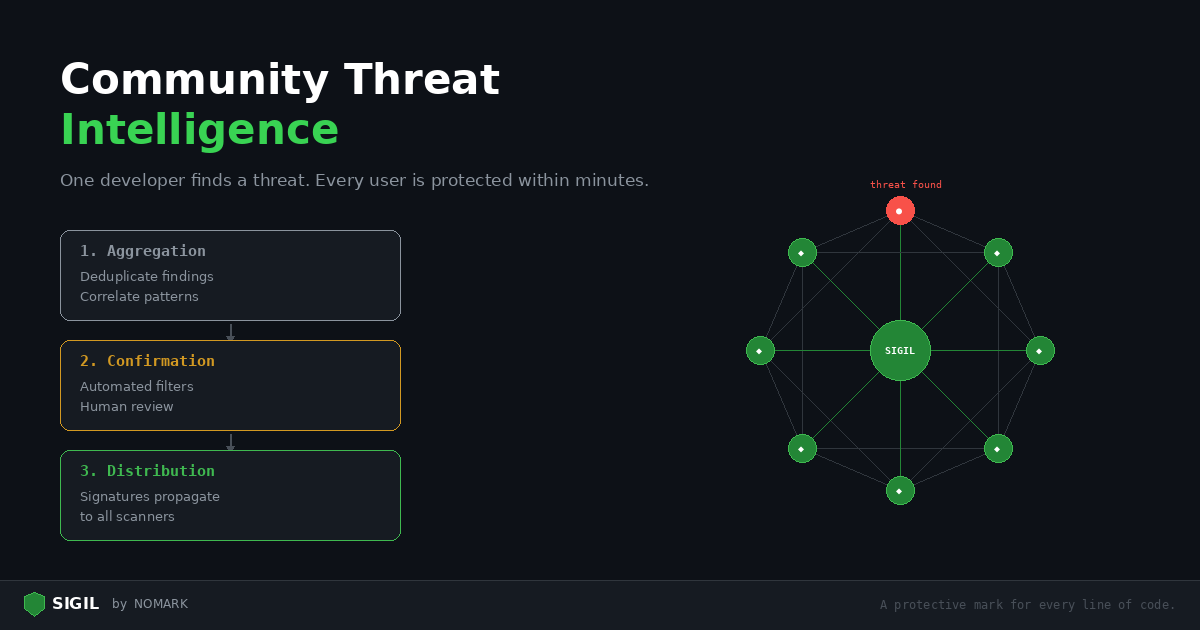
Sigil scans code locally. But some threats can only be caught by looking at the bigger picture — the same malicious package targeting hundreds of developers, a maintainer whose packages keep getting flagged, a new obfuscation technique spreading across ecosystems.
This is what Sigil's community threat intelligence does. Every authenticated scan contributes anonymized metadata to a shared database. When one developer finds a threat, every other Sigil user is protected within minutes.
How it works
What happens during an authenticated scan
-
Local scan runs first. All six phases execute on your machine. No code leaves your device.
-
Metadata is sent to the Sigil API. After the local scan completes, the CLI sends:
-
Which scan rules triggered (e.g., "Phase 1: postinstall hook detected")
-
File type distribution (e.g., "12 Python files, 3 JavaScript files")
-
Risk score and verdict
-
Package name, version, and content hash
- Threat intelligence is returned. The API responds with:
-
Known malicious package matches (hash-based)
-
Publisher reputation score
-
Community-reported threats for this package
-
Updated detection signatures (delta sync)
- Signatures are cached locally. The CLI stores
~/.sigil/signatures.jsonwith a 24-hour TTL, so subsequent scans benefit from the latest patterns even if you go offline.
What is never sent
-
Source code or file contents
-
File paths from your machine
-
Environment variables or credentials
-
Any data from your project beyond scan metadata
The API processes pattern match metadata only. It cannot reconstruct your code from the data it receives.
The threat pipeline
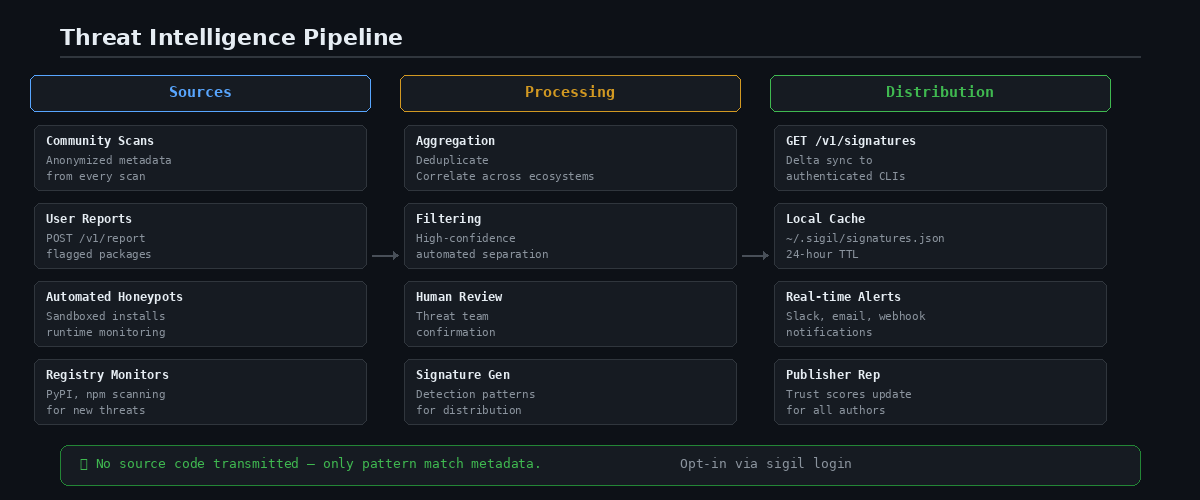
When threats are detected, they flow through a three-stage pipeline:
Stage 1: Aggregation
Community scans produce a continuous stream of metadata. The aggregator:
-
Deduplicates findings across packages and versions
-
Correlates patterns across ecosystems (the same obfuscation in npm and pip)
-
Tracks publisher behavior over time
Stage 2: Confirmation
Not every finding is a true threat. The review pipeline:
-
Automated filters separate high-confidence threats (install hook + credential exfil + obfuscation) from ambiguous signals
-
Community reports (
POST /v1/report) are reviewed by the threat team -
Confirmed threats generate detection signatures
Stage 3: Distribution
Confirmed threats become signatures that propagate to every authenticated scanner:
-
Signatures are versioned and distributed via
GET /v1/signatures -
The CLI fetches updates on each authenticated scan
-
Delta sync minimizes bandwidth — only new signatures are downloaded
-
Cached locally for 24 hours for offline use
Publisher reputation
Sigil tracks publisher reputation — a trust score for package authors based on community data.
How it works:
-
Every scan of a publisher's package contributes to their reputation
-
Clean scans increase the trust score
-
Flagged scans decrease it
-
Multiple confirmed threats from the same publisher trigger a reputation warning
What this means for you:
When you scan a package by a publisher with a low reputation score, Sigil adds a warning to the scan output. Even if this specific package looks clean, the publisher's history suggests extra scrutiny.
Community reports
Anyone can report a malicious package:
```bash sigil login
Report via the dashboard at Settings > Threats > Report
Or via the API:
curl -X POST \ -H "Authorization: Bearer $TOKEN" \ -H "Content-Type: application/json" \ -d '{ "package_name": "malicious-pkg", "source": "npm", "description": "Exfiltrates env vars via postinstall hook", "indicators": ["postinstall", "process.env", "discord.com/api/webhooks"] }' \ https://api.sigilsec.ai/v1/threats/report ```
Reports go through the confirmation pipeline. Once confirmed, a detection signature is generated and distributed to all authenticated scanners.
Privacy guarantees
Threat intelligence is opt-in. It only activates when you run sigil login.
Authenticated mode:
-
Scan metadata is sent to the Sigil API
-
You benefit from community threat data
-
Your scans contribute to the community
Offline mode (default):
-
No network calls
-
No data leaves your machine
-
All six scan phases run locally
-
No threat intelligence lookups
You can switch between modes at any time: bash sigil login # Enable threat intelligence sigil logout # Disable, return to offline mode
Why this matters
A single developer scanning locally can catch patterns. A community of developers scanning together can catch campaigns.
When an attacker publishes a typosquatted package targeting AI developers, the first scan that flags it creates a signal. The second scan from a different user confirms the pattern. Within minutes, every Sigil user who scans that package gets a warning — even if the package would otherwise score LOW on local analysis alone.
This is the network effect of community threat intelligence: the more people use Sigil, the faster threats are detected, and the safer everyone becomes.
Getting started
```bash
Install
curl -sSL https://sigilsec.ai/install.sh | sh
Enable threat intelligence
sigil login
Scan with enrichment
sigil scan . ```
Learn more: Architecture — Threat Intelligence Pipeline | Pricing