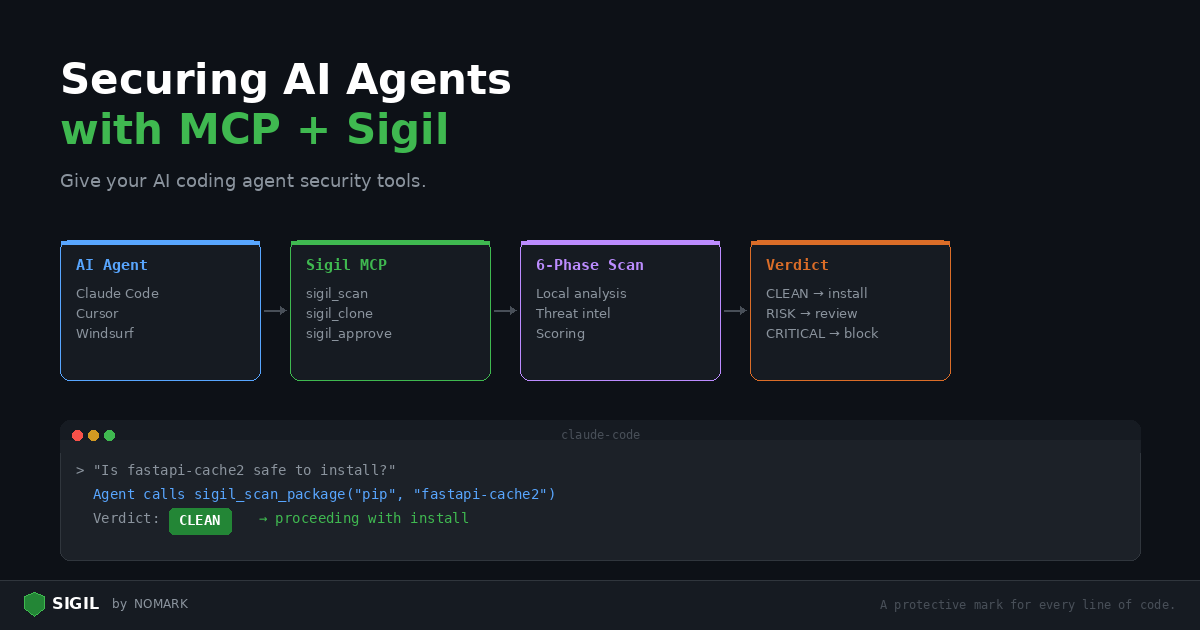
AI coding agents are powerful. They write code, install packages, clone repositories, and modify your file system. But they have a blind spot: they trust every package equally. An agent cannot tell the difference between requests and a typosquatted reqeusts that steals your API keys.
This post shows how to give your AI agent security tools by connecting Sigil via MCP.
The problem
Consider this interaction with an AI coding agent:
You: "Install the langchain-experimental package and set up a basic agent"
The agent runs pip install langchain-experimental. If that package has a malicious postinstall hook or a trojanized dependency, it is already too late. The agent installed it without checking.
Now consider the same interaction with Sigil connected:
You: "Install the langchain-experimental package and set up a basic agent"
The agent calls sigilscanpackage(manager="pip", package_name="langchain-experimental"), gets a CLEAN verdict, then proceeds with the install.
The difference is one MCP tool call. The setup takes five minutes.
Step 1: Install Sigil
bash curl -sSL https://sigilsec.ai/install.sh | sh
Verify: sigil help
Step 2: Build the MCP server
bash cd /path/to/sigil/plugins/mcp-server npm install npm run build
Step 3: Configure Claude Code
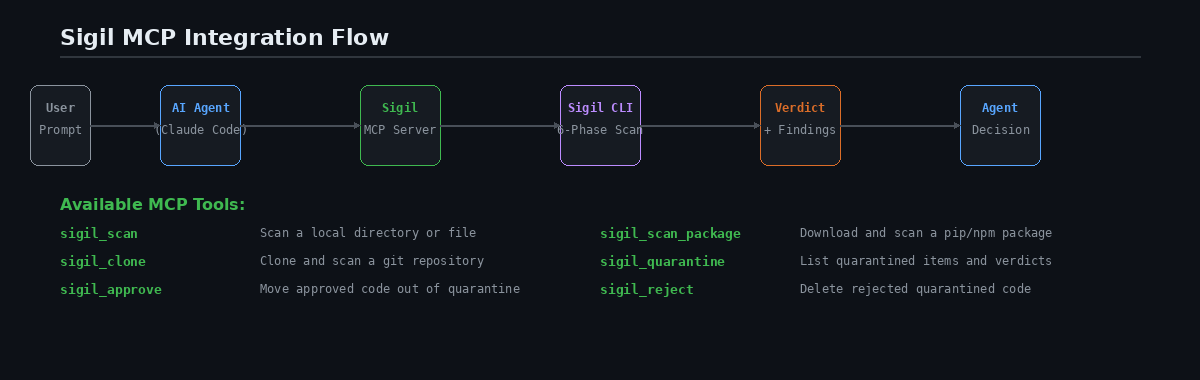
Add to ~/.claude/claudedesktopconfig.json:
json { "mcpServers": { "sigil": { "command": "node", "args": ["/path/to/sigil/plugins/mcp-server/dist/index.js"] } } }
For per-project setup, add .mcp.json to your project root:
json { "mcpServers": { "sigil": { "command": "node", "args": ["./plugins/mcp-server/dist/index.js"] } } }
Step 4: Use it naturally
Once connected, the agent has six security tools available. You do not need special syntax — just ask naturally:
"Is this package safe?"
You: "Is the
fastapi-cache2pip package safe to install?"
The agent calls sigilscanpackage and reports the verdict. If CLEAN, it proceeds. If findings exist, it shows you what triggered and asks for your decision.
"Audit this repo before I use it"
You: "Clone and audit https://github.com/someone/agent-toolkit before I use it"
The agent calls sigil_clone, reviews the scan results, and tells you whether the repo is safe.
"Scan this project"
You: "Scan the current project for security issues"
The agent calls sigil_scan with path: "." and presents findings grouped by severity.
"What's in quarantine?"
You: "Show me what's in quarantine and approve the clean ones"
The agent calls sigilquarantine, lists items, then uses sigilapprove for CLEAN items and asks you about the rest.
What the agent sees
When the agent calls sigil_scan, it gets back structured data:
``` Verdict: MEDIUM | Score: 12 | 3 findings | 47 files scanned in 850ms
[HIGH] eval_usage — src/parser.py:42 result = eval(expression)
[MEDIUM] envaccess — src/config.py:5 apikey = os.environ.get('API_KEY')
[LOW] outbound_http — src/api.py:18 requests.post(endpoint, json=data) ```
The agent can interpret the verdict, explain each finding in plain English, and make a recommendation. This is exactly what human security reviewers do — but the agent does it automatically on every install.
Advanced: agent guardrail patterns
Auto-scan before every install
Instruct your agent to always scan before installing:
"Before installing any package, always scan it with sigilscanpackage first. Only proceed if the verdict is CLEAN or LOW. For MEDIUM or above, show me the findings and ask for confirmation."
This turns your agent into a security-aware developer that checks before it acts.
CI security review agent
Build an agent that reviews scan results and posts PR comments:
-
CI runs
sigil scan . --format json -
Agent reads the JSON output
-
Agent explains each finding in plain English
-
Agent posts a summary as a PR comment
-
Agent recommends approve or block
Quarantine management agent
An agent that helps triage the quarantine backlog:
-
Agent calls
sigil_quarantineto list items -
For each item, agent explains the scan findings
-
Agent auto-approves CLEAN items
-
Agent creates a summary for items needing human review
For Cursor and Windsurf users
The same MCP server works with Cursor and Windsurf. Add the server configuration in your MCP settings — the format is identical to Claude Code.
Cursor: Settings > MCP Servers Windsurf: Settings > MCP
What data leaves your machine?
The MCP server calls the local sigil CLI, which runs all six scan phases locally. If you are logged in (sigil login), scan metadata is sent to the Sigil cloud for threat intelligence enrichment. Source code is never transmitted.
If you are not logged in, everything stays local. No network calls are made.
Full MCP documentation: MCP Integration Guide | Install: curl -sSL https://sigilsec.ai/install.sh | sh