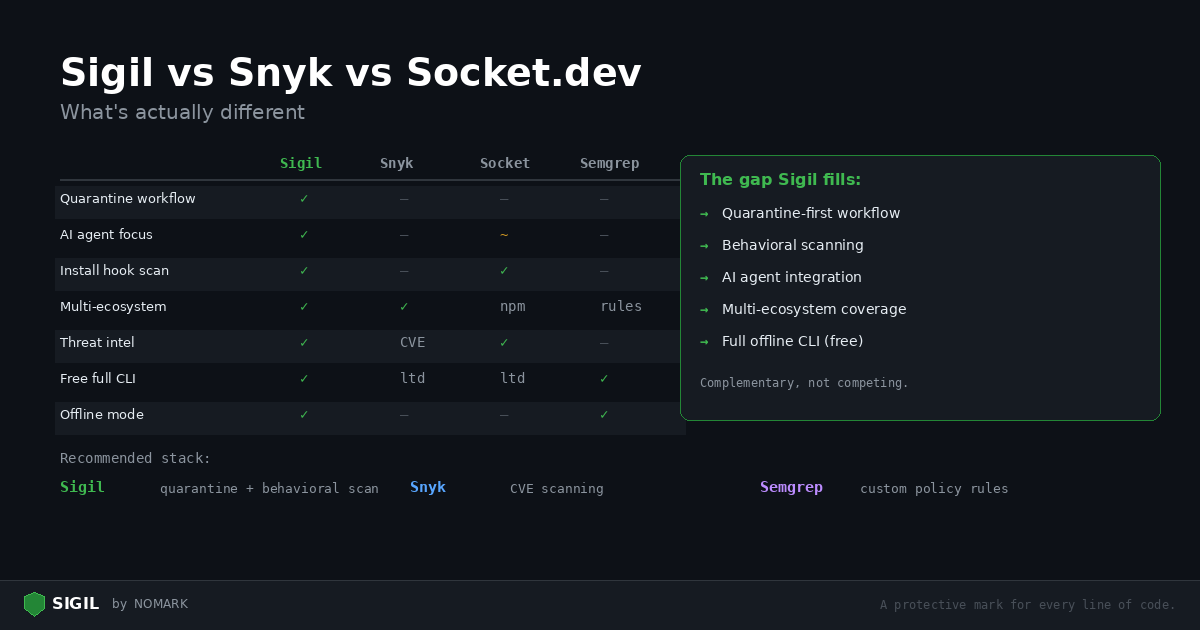
Developers evaluating security tools face a crowded market. Snyk, Socket.dev, Semgrep, CodeQL, and now Sigil all claim to protect your code. This post is an honest comparison of what each tool does well and where Sigil fills a different gap.
The short answer: these tools are complementary, not competing. They solve different problems. Here's the breakdown.
What Snyk does well
Snyk is the standard for dependency vulnerability scanning. It maintains a comprehensive CVE database, integrates with every CI system, and supports a wide range of ecosystems. If a vulnerability has been disclosed and assigned a CVE, Snyk finds it.
Where Snyk falls short for AI developers:
-
No quarantine workflow. Snyk scans after you've already installed a package.
-
No behavioral detection. Snyk matches CVE numbers, not code patterns. A brand-new malicious package with no CVE won't trigger an alert.
-
No MCP/agent integration. Snyk has no mechanism for AI agents to scan before installing.
-
No install hook detection. A
postinstallscript that exfiltrates credentials is invisible to Snyk.
What Socket.dev does well
Socket is the closest tool to Sigil in philosophy. It analyzes package behavior — looking for telemetry, install scripts, network access, and filesystem operations. Socket is strong on npm and has a good browser extension for reviewing packages on the npm registry.
Where Socket falls short:
-
npm-only. Socket does not scan Python packages, git repos, or arbitrary directories.
-
No quarantine. Socket alerts you to risky packages but doesn't prevent them from running.
-
No local CLI with full offline mode. Socket requires cloud connectivity.
-
No MCP server for AI agents.
What Semgrep does well
Semgrep is an excellent pattern-matching engine. You write rules, and Semgrep finds matches across your codebase. It supports dozens of languages and has a large community rule library.
Where Semgrep falls short:
-
Not an end-to-end workflow. Semgrep finds patterns; it doesn't quarantine, score, or manage the lifecycle.
-
You need to write (or find) rules for everything. Sigil's six phases are built in.
-
No package scanning workflow. Semgrep scans code on disk, not packages before install.
-
No threat intelligence. Semgrep doesn't know if a package has been reported as malicious by other users.
What CodeQL does well
CodeQL is GitHub's deep semantic analysis engine. It builds a database of your code and lets you query it like a database. CodeQL finds complex vulnerabilities that pattern matchers miss — taint tracking, control flow analysis, data flow analysis.
Where CodeQL falls short:
-
GitHub-only. CodeQL requires your code to be hosted on GitHub.
-
Slow. Building a CodeQL database takes minutes to hours.
-
No quarantine or package scanning workflow.
-
No offline mode.
Where Sigil fits
Sigil is not a replacement for any of these tools. It fills a gap that none of them address: quarantine-first behavioral scanning for untrusted code.
The recommended stack
| Capability | Sigil | Snyk | Socket | Semgrep | CodeQL |
|---|---|---|---|---|---|
| Quarantine before execution | Yes | No | No | No | No |
| Install hook detection | Yes | No | Yes (npm) | No | No |
| Behavioral scanning (eval, exec, exfil) | Yes | No | Partial | Rules needed | Rules needed |
| Multi-ecosystem (pip, npm, git, URL) | Yes | Yes | npm only | Any (rules) | GitHub only |
| AI agent / MCP integration | Yes | No | No | No | No |
| Community threat intelligence | Yes | Advisory DB | Yes | Community | No |
| Offline mode (no account) | Yes | No | No | Yes (OSS) | No |
| CVE / advisory database | No | Yes | Partial | No | Yes |
| Deep semantic analysis | No | No | No | Partial | Yes |
| Free CLI with all features | Yes | Limited | Limited | OSS free | Public repos |
For comprehensive security, use multiple tools:
-
Sigil — quarantine-first scanning for every new package, repo, and MCP server you install. Catches intentionally malicious code.
-
Snyk or Dependabot — continuous CVE scanning for your dependency tree. Catches known vulnerabilities.
-
Semgrep — custom rules for your organization's security policies. Catches organization-specific patterns.
Sigil integrates with Semgrep: if semgrep is installed on your system, Sigil runs it as an additional scanner during every scan.
Try it yourself
The best way to evaluate is to scan the same project with each tool and compare results:
```bash
Install Sigil
curl -sSL https://sigilsec.ai/install.sh | sh
Scan your project
sigil scan .
Compare with Snyk
snyk test
Compare with Semgrep
semgrep --config=auto . ```
Sigil's findings will be different from Snyk's — and that's the point. They catch different things.
Install Sigil: curl -sSL https://sigilsec.ai/install.sh | sh | Full documentation