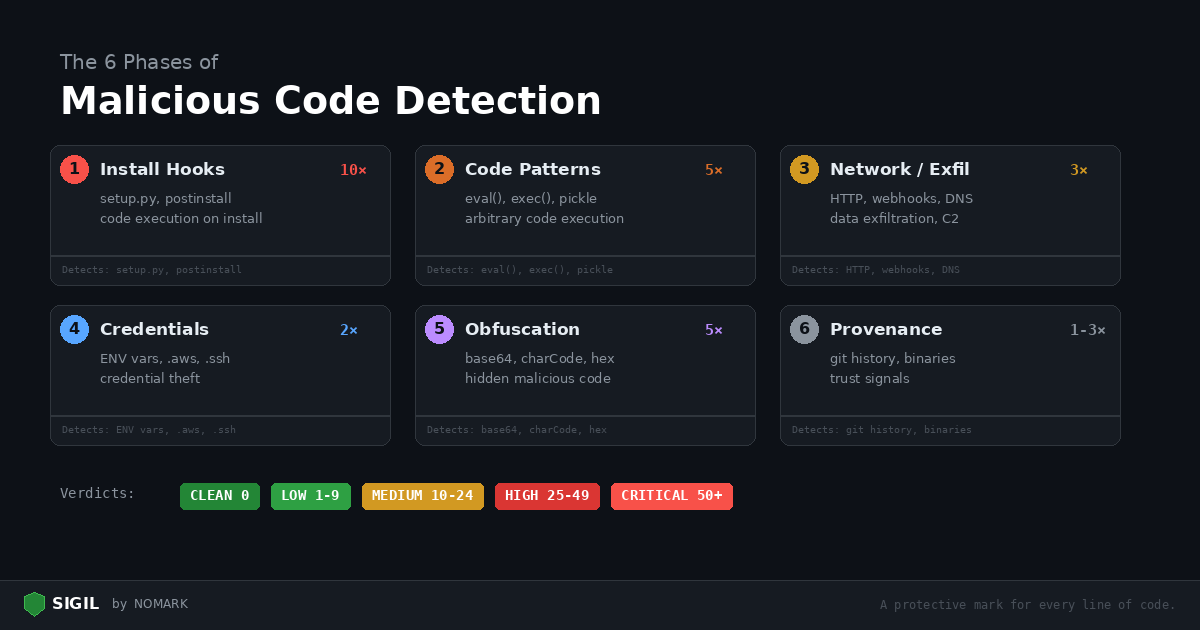
Every Sigil scan runs six analysis phases. Each phase targets a specific category of malicious behavior, and each has a severity weight that reflects how dangerous that behavior is in untrusted code.
This post explains what each phase detects, why it matters, and how to read the findings.
How scoring works
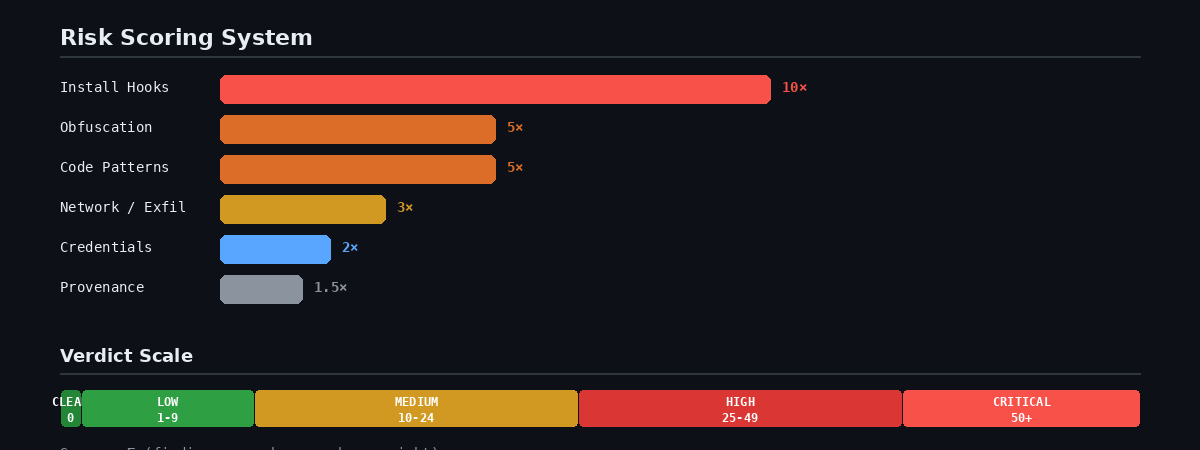
Each finding contributes to a cumulative risk score:
Score = sum of (findingsinphase × phase_weight)
A single postinstall hook (Phase 1, weight 10x) scores higher than five os.environ accesses (Phase 4, weight 2x) because install hooks are far more dangerous — they execute before you see the code.
Phase 1: Install Hooks (10x weight)
| Score | Verdict | What to do |
|---|---|---|
| 0 | CLEAN | Approve |
| 1-9 | LOW RISK | Review the flagged items |
| 10-24 | MEDIUM RISK | Read every finding manually |
| 25-49 | HIGH RISK | Do not approve without thorough review |
| 50+ | CRITICAL | Reject |
Why it's critical: Install hooks execute automatically during pip install or npm install, before you review any code. A malicious hook can compromise your machine in under a second.
What Sigil detects:
-
setup.pywithcmdclass— custom Python install commands -
subprocessoros.systemcalls insetup.py -
npm lifecycle scripts:
preinstall,postinstall,preuninstall -
Makefile
installtargets that download or execute remote code
Example finding:
[FAIL] npm postinstall hook detected: package.json:5: "postinstall": "node scripts/init.js"
What to do: Read the script that the hook calls. If it does anything beyond basic setup (downloading files, accessing environment variables, making network requests), reject the package.
Phase 2: Code Patterns (5x weight)
Why it's high: These are the building blocks of malicious payloads. While legitimate code uses some of these patterns, their presence in untrusted code is a strong signal.
What Sigil detects:
| Pattern | Language | Risk |
|---|---|---|
eval(), exec() |
Python/JS | Arbitrary code execution |
compile() |
Python | Dynamic code compilation |
import(), importlib |
Python | Dynamic module loading |
subprocess with shell=True |
Python | Shell injection |
os.system(), os.popen() |
Python | Direct shell execution |
pickle.loads(), marshal.loads() |
Python | Unsafe deserialization |
yaml.load() (without SafeLoader) |
Python | Code execution via YAML |
child_process |
Node.js | Shell execution |
Function(), vm.runInNewContext |
Node.js | Dynamic code evaluation |
Example finding:
[warn] eval() usage: src/parser.py:42: result = eval(expression)
What to do: Check whether the input to eval() is controlled by the user or comes from an untrusted source. If it processes user input, it's dangerous. If it evaluates a constant expression in a build script, it's likely safe.
Phase 3: Network / Exfiltration (3x weight)
Why it's high: Outbound network calls in a package that should be a string utility is a major red flag. This phase catches data exfiltration and command-and-control channels.
What Sigil detects:
-
HTTP clients:
requests.post,urllib,fetch(),axios,http.client -
Raw sockets:
socket.connect, WebSocket connections -
Reverse tunnels: ngrok patterns
-
Webhook exfiltration: Discord, Telegram, Slack webhook URLs
-
DNS tunneling: data encoded in DNS queries
Example finding:
[FAIL] Outbound HTTP request: scripts/init.js:6: https.request({hostname: 'webhook.site', ...})
What to do: Ask whether this package has a legitimate reason to make outbound HTTP requests. A database driver needs to connect to a database. A string formatting library does not need to POST to Discord.
Phase 4: Credentials (2x weight)
Why it's medium: Many legitimate applications access environment variables and config files. The weight is lower, but findings here combined with network exfiltration (Phase 3) are a strong indicator of credential theft.
What Sigil detects:
-
Environment variable access:
os.environ,process.env -
Credential file paths:
.aws/credentials,.kube/config,.ssh/ -
API key patterns:
OPENAIAPIKEY,ANTHROPICAPIKEY,AWS_SECRET -
Database connection strings:
DATABASE_URL -
Keychain/credential store access
Example finding:
[warn] Environment variable access: src/config.py:5: apikey = os.environ.get('APIKEY')
What to do: A web framework reading DATABASE_URL from the environment is normal. A "file converter" package reading .aws/credentials is not. Context matters — credential access combined with network exfiltration in the same package is almost always malicious.
Phase 5: Obfuscation (5x weight)
Why it's high: Legitimate code has no reason to hide what it does. Obfuscation in untrusted packages is a strong signal that someone is trying to evade manual review.
What Sigil detects:
-
Base64 decoding:
base64.b64decode,atob(),Buffer.from(..., 'base64') -
Character code tricks:
String.fromCharCode,charCodeAt -
Hex escape sequences:
\x68\x74\x74\x70(spells "http") -
Minified or packed payloads with suspiciously long strings
Example finding:
[FAIL] Character code obfuscation: lib/utils.js:2: const u = c.map(x => String.fromCharCode(x)).join('')
What to do: Decode the obfuscated string and check what it resolves to. If it's a URL, an API key, or a shell command, reject the package immediately.
Phase 6: Provenance (1-3x weight)
Why it's low-medium: Provenance signals are weaker individually but help paint a picture. A package with no git history, a single author, and a binary executable inside is suspicious.
What Sigil detects:
-
Git history: shallow or absent git history, single-author repos
-
Binary files: executables, shared libraries, compiled code in source packages
-
Hidden files: dotfiles that shouldn't be there (
.backdoor,.payload) -
Large files: suspiciously large files in small packages
-
Filesystem operations: file permission changes, symlink creation
Example finding:
[info] Shallow git history — 2 commits, 1 author [warn] Binary executable found: bin/helper
What to do: A brand-new package with one commit and one author deserves extra scrutiny. Check the author's other packages and their GitHub profile. Binary executables in source packages should always be investigated.
Supplementary checks
After the six phases, Sigil runs additional checks:
External scanners (if installed): semgrep, bandit, trufflehog, safety, npm audit. These add depth to the built-in phases.
Dependency analysis: Counts dependencies and checks for unpinned versions. A package with 200 dependencies has a larger attack surface than one with 3.
Permission/scope analysis: Checks for Docker privileged mode, GitHub Actions secrets access, and MCP tool configurations that request dangerous permissions.
Reading the report
Every scan produces a report at ~/.sigil/reports/_report.txt. The report lists every finding from every phase with:
-
Severity: FAIL, warn, or info
-
Phase: Which scan phase triggered
-
Rule: Which pattern matched
-
Location: File path and line number
-
Snippet: The actual code that triggered the finding
Read the report, check each finding against its context, and make your decision.
```bash sigil scan .
Review the verdict
For details:
cat ~/.sigil/reports/_report.txt ```
Learn more: Scan Phases Reference | Install: curl -sSL https://sigilsec.ai/install.sh | sh