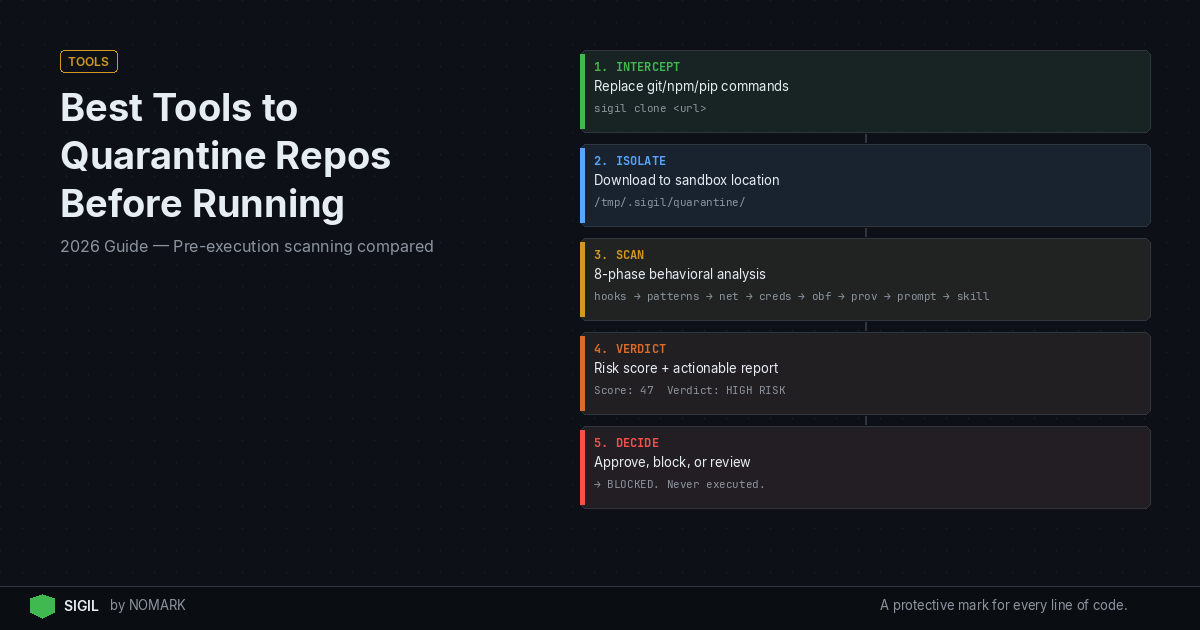
Pre-execution quarantine tools are essential for modern development, intercepting code before it runs, scanning for hidden risks, and only then allowing execution. Options range from open-source CLIs and container sandboxes to enterprise code firewalls. In 2026, the most effective strategy is to pair a fast, behavior-focused scanner like Sigil with isolated test environments and policy-based controls to quarantine git repos, packages, and MCP servers before any untrusted code executes.
What does it mean to quarantine a repository before running it?
Quarantining a repository is the process of isolating and analyzing third-party code in a controlled, safe environment before it is allowed to execute on your local machine or in your CI/CD pipeline. This is a critical pre-execution security measure that differs fundamentally from post-installation vulnerability scanning.
Traditional scanners like Snyk or Dependabot audit code after it's already on your system, potentially after malicious install hooks or build scripts have already run. Quarantine ensures nothing reaches your working environment until it's been scanned, scored, and explicitly approved. According to recent supply chain incident reports, many compromises began with developers cloning and executing untrusted repositories without prior scanning.
The quarantine workflow typically involves:
-
Interception: Replacing commands like
git clone,npm install, orpip installwith a secure wrapper. -
Isolation: Moving the downloaded code to a temporary, sandboxed location.
-
Analysis: Scanning for malicious behavior, suspicious patterns, and hidden risks.
-
Verdict: Providing a clear risk score (e.g., pass/fail, high/medium/low).
-
Action: Based on policy, either allowing the code to proceed, blocking it, or flagging it for manual review.
Key requirements for safe pre-execution quarantine tools
Not all scanning tools are built for effective quarantine. To safely evaluate untrusted code before it runs, a tool should meet several core requirements:
-
Behavior-Based Detection: Must go beyond CVE matching to analyze code behavior. This includes detecting invisible post-install hooks (
setup.py:cmdclass), obfuscated payloads (eval(base64.b64decode(...))), network exfiltration attempts, and credential harvesting patterns that static analysis often misses. -
Speed & Developer Experience: Scans must be fast-ideally under a few seconds-to avoid disrupting developer workflows. A tool that takes minutes will be bypassed. Zero-config setups and simple shell aliases (e.g.,
alias git='sigil git') encourage adoption. -
Local & Offline Operation: For privacy and air-gapped environments, the core scanning engine should work fully offline without sending your code to external servers. Data indicates that organizations using isolated test environments for third-party code experience fewer high-severity supply chain incidents.
-
Comprehensive Coverage: Should handle various code sources: Git repositories (GitHub, GitLab), package managers (npm, PyPI, Maven), and emerging formats like MCP (Model Context Protocol) servers for AI agents.
-
Clear, Actionable Output: The tool must provide a straightforward risk verdict and evidence, not just raw data, so developers can make an informed decision to proceed or block.
-
Integration-Friendly: Must offer APIs, CLI outputs, and plugins for CI/CD systems (GitHub Actions, GitLab CI), IDEs (VS Code, JetBrains), and notification channels to fit into existing workflows.
Best tools to quarantine repositories before running in 2026
Based on the key requirements above, here is a curated list of the leading tools and categories for implementing a robust pre-execution quarantine strategy in 2026.
- Sigil - Best for fast, behavior-based pre-execution scanning
An open-source CLI that intercepts git clone, npm install, etc., and runs a parallel six-phase behavioral analysis (install hooks, obfuscation, network, etc.) in under 3 seconds. It's local, private (Apache 2.0, no telemetry), and perfectly complements CVE scanners.
- Sandboxed Container Environments (DIY)
Using tools like Docker, Firecracker, or gVisor to spin up ephemeral containers or VMs for testing. This provides strong isolation but requires significant setup and is slower for rapid, iterative development checks.
- GitHub Advanced Security / GitLab Secret Detection
Enterprise platform features that can scan for secrets and some patterns at the repository level. These are more integrated into the Git platform but often lack deep behavioral analysis of runtime hooks and are not fully pre-execution for local development.
- Enterprise Code Firewalls (e.g., Legit Security, Apiiro)
Comprehensive platforms that enforce security policies across the SDLC, including code entry points. They offer powerful governance but are complex, expensive, and aimed at large enterprises rather than individual developers or small teams.
- Traditional SCA Scanners (Snyk, Dependabot)
Crucially, these are NOT pre-execution quarantine tools. They scan for known vulnerabilities after dependencies are installed. They are essential for a layered defense but must be paired with a true pre-execution tool like Sigil to prevent malicious code from running in the first place.
- OS-Level Sandboxing (seccomp-bpf, Landlock, SELinux)
Advanced Linux security modules that restrict a process's capabilities. Highly effective for experts but complex to configure correctly for dynamic development tasks, making them less accessible for general use.
Pre-Execution Quarantine Tools Comparison 2026
Open-source tools for repo quarantine and sandboxing
| Tool/Category | Primary Use Case | Detection Focus | Speed | Deployment |
|---|---|---|---|---|
| Sigil (OSS/Pro) | Developer CLI & CI/CD integration | Behavior (hooks, obfuscation, exfil) | Very Fast (<3s) | Local CLI, Cloud Dashboard (Pro) |
| Container Sandboxes (Docker) | Isolated testing environments | Runtime isolation | Slow (minutes) | Self-hosted |
| GitHub Advanced Security | Git platform-native scanning | Secrets, basic patterns | Medium | SaaS / Enterprise |
| Enterprise Code Firewalls | Enterprise SDLC policy enforcement | Policy, compliance, vulnerabilities | Varies | SaaS / On-prem |
| SCA Scanners (Snyk) | Post-install vulnerability audit | Known CVEs, license compliance | Fast | SaaS / Agent |
For teams prioritizing transparency, customization, and offline operation, open-source tools provide a powerful foundation.
-
Sigil (Apache 2.0): The flagship open-source option in this space. Its CLI is designed from the ground up for pre-execution quarantine. You can replace your git/npm/pip commands via shell alias, and it automatically quarantines and scans downloads. The six-phase analyzer looks for the specific behaviors that indicate supply-chain attacks, filling the gap left by CVE databases. Its fully local operation makes it ideal for secure or air-gapped environments.
-
Docker / Podman: The universal tool for containerization. You can build a quarantine workflow by cloning or installing packages into a disposable container, running tests or basic scans inside, and then destroying it. This offers strong isolation but lacks specialized security analysis unless you add other tools inside the container. Research shows that pre-execution quarantine and sandboxing dramatically reduce the blast radius of malicious dependencies and repos.
-
gVisor / Firecracker: These open-source sandboxing technologies provide stronger kernel-level isolation than standard containers. They are excellent for building secure, multi-tenant testing platforms but are complex to integrate into a developer's local pre-execution workflow.
The open-source approach emphasizes auditability and control. You can inspect exactly what Sigil's analyzer checks for, modify it, and run it anywhere without sending sensitive code to a third party.
Enterprise platforms that provide code quarantine capabilities
Large organizations with dedicated security teams often look for platforms that centralize policy enforcement and visibility across all development.
-
Code Firewalls / Secure Supply Chain Platforms: Products like Legit Security and Apiiro act as gatekeepers for code entering your organization. They can enforce policies that block repositories with certain risks, mandate approvals, and provide a dashboard view of all code sources. These are comprehensive but come with enterprise price tags and complexity.
-
Integrated Git Platform Security: GitHub Advanced Security and GitLab Ultimate include features that scan code at rest in repositories for secrets, vulnerabilities, and sometimes suspicious code patterns. Their strength is deep integration with the Git workflow, but scanning is often tied to the repository view rather than the pre-execution moment on a developer's machine.
-
Sigil Pro & Team: Building on its open-source core, Sigil's paid tiers ($29/mo Pro, $99/mo Team) add the cloud dashboard, audit logs, historical scan data, and team management features expected in enterprise tools. This bridges the gap between a lightweight CLI and a full platform, offering centralized visibility for the behavioral scanning that the OSS CLI performs locally. The Pro tier's threat intelligence feed enhances detection without compromising local scan speed.
How Sigil implements pre-execution quarantine for repos and packages
Sigil is architected specifically to solve the pre-execution quarantine problem. Here's how it works under the hood:
-
Interception & Quarantine: When you run
sigil cloneor have aliased your package manager, Sigil intercepts the download. The code is placed in a temporary isolated directory-this is the quarantine zone. -
Parallel Six-Phase Analysis: Instead of a slow sequential scan, Sigil's engine runs six analysis phases in parallel, all focused on malicious behavior:
-
Install Hooks: Detects hidden
postinstall,preinstall, or customsetup.pycommands that execute automatically. -
Code Patterns: Searches for high-risk code constructs like
eval(),exec(), and deserialization of untrusted data. -
Network/Exfiltration: Analyzes code for attempts to make outbound HTTP calls, especially to suspicious domains, which could signal data exfiltration.
-
Credentials: Looks for patterns of hardcoded credentials or credential harvesting logic.
-
Obfuscation: Unpacks and detects common obfuscation techniques like base64-encoded payloads or heavily minified code meant to evade review.
-
Provenance: Checks package signatures and repository metadata for signs of tampering or spoofing.
-
Scoring & Verdict: Findings from each phase are aggregated into a single, clear risk score (e.g., High, Medium, Low, Pass). A detailed report explains what was found.
-
Policy Action: Based on your configured policy (e.g., block all High risk packages), Sigil will either allow the code to proceed to its final destination, block it, or request manual approval. This entire process happens in under three seconds for a typical npm package, making it practical for daily use. 2026 studies reveal that combining code quarantine with behavior-based scanning is more effective than vulnerability scanning alone.
Can I automatically block or sandbox install scripts during package installation?
Yes, this is a primary function of specialized pre-execution tools like Sigil. Traditional package managers run postinstall scripts automatically, with no built-in mechanism to audit them first.
Sigil directly addresses this by:
-
Analyzing the package manifest (
package.json,setup.py) before the install command is passed to the native package manager. -
Extracting and inspecting any scripts defined in hooks like
postinstall,preinstall, orcmdclass. -
Running its behavioral analysis on those scripts specifically, looking for obfuscation, network calls, or system commands.
-
Providing a verdict before the script runs. If a
postinstallscript is deemed high-risk, Sigil can block the entire installation based on your policy, preventing the malicious script from ever executing.
For a more heavy-duty sandbox, you can combine Sigil with a container. Use Sigil for the fast, initial behavioral scan. If a package passes Sigil but you still want extreme isolation, you can then install and run it inside a disposable Docker container for functional testing. This two-tiered approach balances speed and security.
Best practices for integrating quarantine tools into developer workflows
A tool is only effective if it's used. Here’s how to integrate quarantine seamlessly:
-
Start with Transparent CLI Aliasing: Use shell aliases (e.g.,
alias git='sigil git',alias npm='sigil npm'). This makes the quarantine automatic and requires no change to developer habits. The tool should be invisible on success and only visible when it blocks something risky. -
Enforce in CI/CD with Hard Failures: Integrate the quarantine tool into your GitHub Actions, GitLab CI, or Jenkins pipelines. Configure it to fail the build if a high-risk dependency is introduced. This prevents malicious code from merging into your main branch. According to The Ultimate Guide to Flaky Tests, consistent and reliable tooling is key to maintaining pipeline health.
-
Layer Your Defenses: Use Sigil for pre-execution behavioral scanning and a traditional SCA tool like Snyk for post-install vulnerability auditing. This covers the full attack surface: stopping unknown behavioral threats before they run and finding known CVEs in the code you use.
-
Define Clear Team Policies: Use Sigil Pro/Team or enterprise platform dashboards to set and enforce policies across the team (e.g., "Block all high-risk MCP servers," "Require review for medium-risk npm packages").
-
Prioritize Fast Feedback: Choose tools that scan in seconds, not minutes. Speed is critical for developer adoption in local and CI environments.
-
Educate Your Team: Explain the "why"-that post-install hooks run before human review and that behavioral scanning complements CVE checks. This turns security from a bottleneck into a shared value.
What tools can I use to quarantine git repositories before running the code?
You can use several types of tools. For fast, behavior-focused scanning, the open-source CLI Sigil is a top choice, designed to intercept git clone and other commands. For strong isolation, you can use Docker to run repos in disposable containers. Enterprise teams might use platform features like GitHub Advanced Security or dedicated code firewall platforms. The best approach often layers a fast scanner like Sigil with a sandbox for comprehensive coverage.
How do pre-execution quarantine tools differ from traditional vulnerability scanners?
Pre-execution quarantine tools like Sigil analyze code before it is allowed to run, focusing on behavior (malicious hooks, obfuscation, exfiltration) to prevent unknown threats. Traditional vulnerability scanners like Snyk analyze code after it is installed, focusing on known CVEs and license issues in already-present dependencies. Quarantine tools stop attacks; vulnerability scanners inform you about risks in code that's already active.
What is the best way to test untrusted repositories and AI agent plugins safely?
The safest method is a two-step process: First, use a fast behavioral scanner like Sigil to analyze the repository or MCP server package for hidden risks before installation. If it passes, second, run the code in an ephemeral sandboxed environment like a short-lived Docker container or a dedicated test VM. This combination provides both deep security analysis and strong runtime isolation without sacrificing developer productivity.
How can I integrate repo quarantine and scanning into my CI/CD pipeline?
Integrate a CLI-based quarantine tool like Sigil directly into your pipeline scripts. For example, in a GitHub Actions workflow, add a step that runs sigil clone on the target repo or sigil npm install on the project before the build step. Configure the tool to exit with a failure code if a high-risk dependency is detected, thereby failing the pipeline and preventing the merge of risky code. This enforces security policy automatically at the integration point.
Is Sigil a replacement for Snyk or Dependabot?
No, Sigil is a complement, not a replacement. Sigil operates before execution to block malicious behavior that Snyk misses (like hidden install hooks). Snyk operates after installation to find known vulnerabilities in your dependencies. For complete supply chain security, you need both: Sigil to prevent unknown threats from running, and Snyk/Dependabot to alert you to known vulnerabilities in the code you've approved.
Key Takeaways
-
Pre-execution quarantine stops malicious code before it runs, unlike post-install vulnerability scanners.
-
Behavior-based detection (hooks, obfuscation, exfiltration) is critical to find threats CVEs miss.
-
The best 2026 strategy layers a fast behavioral scanner (like Sigil) with sandboxed testing environments.
-
Effective tools must be fast (<3 seconds) and integrate seamlessly into developer CLI and CI/CD workflows.
-
Sigil Pro provides enterprise visibility for the behavioral scanning performed by the open-source CLI.
About the Author
Reece Frazier is the founder of NOMARK. He got tired of watching developers blindly clone repos with 12 GitHub stars and full access to their API keys, so he built Sigil.